About the security
The security of the system is a priority for us so it is guaranteed by an internationally recognised multi-level security system.
SSL
Secure functioning of the system is provided by a security layer called SSL used by the Internet browsers described in the technical requirements chapter.
SSL's task is to create an encrypted secure channel through which communication between the Bank and the User is going on with the highest possible security.
Practically this means that only the two end users, that is the Bank and the User, are able to read and process the data transmitted.
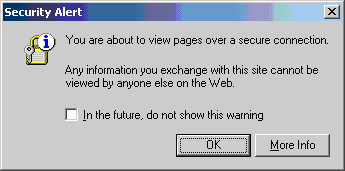
When starting Internet Banking and Mobile Banking, a window will appear asking for permission to use SSL Please allow use of SSL.
The data content of the digital certificate can be checked by doubleclicking the security key/lock icon in the status bar of the browser. The content should be the following
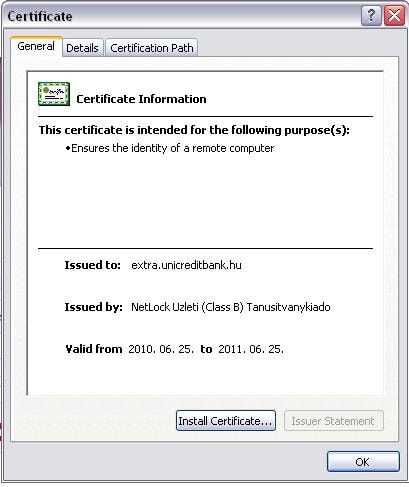
The certificate proves that the data is arriving from the Bank's security web server. If the certificate does not contain the above information please terminate the connection.
User ID + Password (Token, SMS)
Logging in to the Internet Banking and Mobile Banking and signing (authorizing) orders - both in case of Internet Banking and Mobile Banking Light and Plus service packages - may only be done by using one of the following two methods:
- Text message (SMS)
For the authorization of orders the Bank will send a one-off password in a text message to the User's mobile phone number indicated in the Agreement, whereas the system can be accessed by using the User ID and a regular password (which can be modified by the User any time after logging-in).
- Token
The User will use a Token to generate the password to log in to the SpectraNet Internet Banking or SpectraNet Mobile Banking and to authenticate orders.
The Token is basically a code generator, which, depending on the time of the use and the serial number of the Token, will provide a one-off code (valid for about 30 seconds). A precondition of using the Token is that the User should know the PIN code belonging to the Token.
You can find detailed information on the Token and how to use it in the Token chapter.
Automatic Blocking of User
In case a log in to the SpectraNet Internet Banking and Mobile Banking is attempted with an invalid password three consecutive times or three consecutive attempts to authenticate an order are made with an invalid password the User ID will be automatically rejected from the system and its authentication rights will be blocked as well.
Blocking can only be withdrawn with the help of the Bank's employees (to be requested either in the Bank's branches personally or through UniCredit Telephone Banking Service after an identification procedure.
If the User has access to version 5.10-01 or recent version of installed Spectra or Spectra Light Clients Program, the User will be rejected from the installed program as well and blocking will take effect.
The above is true vice-versa as well.
Blocking the Token
The Token will be blocked automatically if the User tries to generate the Security code with a false PIN code three consecutive times.
Blocking can only be withdrawn with the help of the Bank's employees (to be requested either in the Bank's branches personally or through UniCredit Telephone Banking Service after an identification procedure.
Transaction limit
A transaction limit can be given, limiting the value of transactions involving direct debiting of a given account to be initiated by the User (excluding orders regarding deposits.)
Daily limit
SpectraNet Internet Banking and Mobile Banking assesses the value of the daily limit on each account and the limit concerns all transactions involving direct debiting of a given account excluding orders regarding deposits.
The daily limit is assessed by the system when the order gets to the Bank and the value of the order is subtracted from the daily limit of regarding the User's given account.
If a user has to access to the SpectraNet Internet Banking and Mobile Banking too, the calculation of the daily limit is based on borders sent via both systems.
Automatic log out
In case the user does not use the SpectraNet Internet Banking or Mobile Banking for minutes the User will automatically be logged out in order to prevent unauthorised use.
Repeated log in is possible only with giving a correct User ISD and password.
Further security settings
For secure use of the system please follow the instructions below:
- For security reasons and in order to avoid malicious blockings it is recommended to choose a User ID which can not be guessed easily when knowing the User and his/her environment.
- Keep your User ID and password confidential at all times as well as the PIN code for the Token. (In case you have to note down the codes please do it encrypted and keep them separately from each other and the Token.)
Please keep the Token and your mobile phone in a secure place so that no unauthorised persons can have access to them.
- Please make sure nobody is watching you while you are using the password or the PIN code. If you suspect that an unauthorised person learned the password or the PIN code, please change them immediately. (It is suggested to change the password and the PIN code regularly.)
- If your mobile phone or your Token are stolen or lost, please tell the Bank immediately (UniCredit Telephone Banking +36 1/20/30/70 325 3200) and request blocking of the Token or even blocking the Users related to the Token from the system.
- Please follow transactions of the account on the bank statements as well. If you notice an unauthorised transaction on a bank statement or in the history please immediately report it towards the Bank and request blocking of Internet Banking and Mobile Banking related to the account.
- Please check according to point 2.1 if the SSL certificate has the appropriate content. If it does not, please terminate the connection.
If you finish using Internet Banking and Mobile Banking, please log out from the system using the log out button in order to prevent unauthorised people from using the accounts.
- Please check regularly if your computer has a virus.
It is advised to keep all other browser windows and applications closed while running Internet Banking and Mobile Banking on your computer.